--help -h   Show this help	显示此帮助
--version -V   Print version number	打印版本号
--verbose -v   Be verbose	详细
--archive-verbose -a   Show filenames inside scanned archives	在扫描的档案中显示文件名
--debug   Enable libclamav's debug messages	启用libclamav的调试消息
--quiet   Only output error messages	仅输出错误消息
--stdout   Write to stdout instead of stderr. Does not affect 'debug' messages.	写到stdout而不是stderr。不影响“调试”消息。
--no-summary   Disable summary at end of scanning	扫描结束时禁用摘要
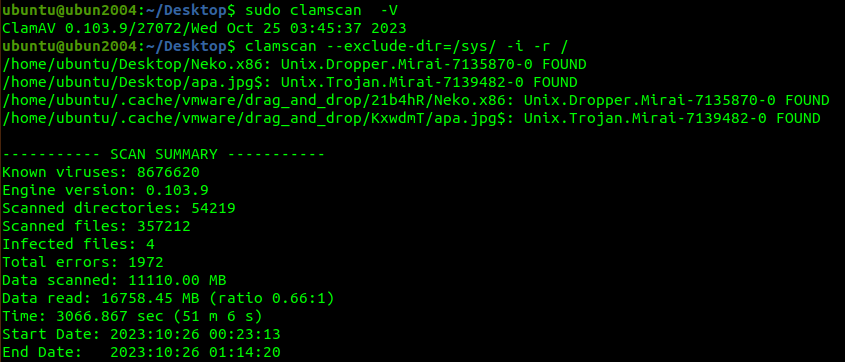
--infected -i   Only print infected files	仅打印受感染的文件
--suppress-ok-results -o   Skip printing OK files	跳过打印OK文件
--bell   Sound bell on virus detection	检测病毒的声音
--tempdir=DIRECTORY   Create temporary files in DIRECTORY	在目录中创建临时文件
--leave-temps[=yes/no(*)]   Do not remove temporary files	不要删除临时文件
--gen-json[=yes/no(*)]   Generate JSON description of scanned file(s). JSON will be printed and alsodropped to the temp directory if --leave-temps is enabled.	生成扫描文件的JSON描述。如果启用--leave-temps,则将打印JSON并将其拖放到temp目录中。
--database=FILE/DIR -d FILE/DIR   Load virus database from FILE or load all supported db files from DIR	从FILE加载病毒数据库或从DIR加载所有受支持的数据库文件
--official-db-only[=yes/no(*)]   Only load official signatures	仅加载官方签名
--log=FILE -l FILE   Save scan report to FILE	将扫描报告保存到FILE
--recursive[=yes/no(*)] -r   Scan subdirectories recursively	递归扫描子目录
--allmatch[=yes/no(*)] -z   Continue scanning within file after finding a match	找到匹配项后继续在文件中扫描
--cross-fs[=yes(*)/no]   Scan files and directories on other filesystems	扫描其他文件系统上的文件和目录
--follow-dir-symlinks[=0/1(*)/2]   Follow directory symlinks (0 = never, 1 = direct, 2 = always)	遵循目录符号链接(0 =永不,1 =直接,2 =始终)
--follow-file-symlinks[=0/1(*)/2]   Follow file symlinks (0 = never, 1 = direct, 2 = always)	跟随文件符号链接(0 =从不,1 =直接,2 =始终)
--file-list=FILE -f FILE   Scan files from FILE	从FILE扫描文件
--remove[=yes/no(*)]   Remove infected files. Be careful!	删除受感染的文件。小心!
--move=DIRECTORY   Move infected files into DIRECTORY	将受感染的文件移至目录
--copy=DIRECTORY   Copy infected files into DIRECTORY	将受感染的文件复制到目录中
--exclude=REGEX   Don't scan file names matching REGEX	不要扫描与REGEX匹配的文件名
--exclude-dir=REGEX   Don't scan directories matching REGEX	不要扫描与REGEX匹配的目录
--include=REGEX   Only scan file names matching REGEX	仅扫描与REGEX匹配的文件名
--include-dir=REGEX   Only scan directories matching REGEX	仅扫描与REGEX匹配的目录
--bytecode[=yes(*)/no]   Load bytecode from the database	从数据库加载字节码
--bytecode-unsigned[=yes/no(*)]   Load unsigned bytecode	加载无符号字节码
--bytecode-timeout=N   Set bytecode timeout (in milliseconds)	设置字节码超时(以毫秒为单位)
--statistics[=none(*)/bytecode/pcre]   Collect and print execution statistics	收集并打印执行统计信息
--detect-pua[=yes/no(*)]   Detect Possibly Unwanted Applications	检测可能有害的应用程序
--exclude-pua=CAT   Skip PUA sigs of category CAT	跳过类别CAT的PUA信号
--include-pua=CAT   Load PUA sigs of category CAT	加载类别为CAT的PUA信号
--detect-structured[=yes/no(*)]   Detect structured data (SSN, Credit Card)	检测结构化数据(SSN,信用卡)
--structured-ssn-format=X   SSN format (0=normal,1=stripped,2=both)	SSN格式(0 =正常,1 =剥离,2 =两者)
--structured-ssn-count=N   Min SSN count to generate a detect	最小SSN计数以生成检测
--structured-cc-count=N   Min CC count to generate a detect	最小CC计数以生成检测
--scan-mail[=yes(*)/no]   Scan mail files	扫描邮件文件
--phishing-sigs[=yes(*)/no]   Enable email signature-based phishing detection	启用基于电子邮件签名的网络钓鱼检测
--phishing-scan-urls[=yes(*)/no]   Enable URL signature-based phishing detection	启用基于URL签名的网络钓鱼检测
--heuristic-alerts[=yes(*)/no]   Heuristic alerts	启发式警报
--heuristic-scan-precedence[=yes/no(*)]   Stop scanning as soon as a heuristic match is found	找到启发式匹配项后立即停止扫描
--normalize[=yes(*)/no]   Normalize html, script, and text files. Use normalize=no for yara compatibility	规范化html,脚本和文本文件。使用normalize = no获得yara兼容性
--scan-pe[=yes(*)/no]   Scan PE files	扫描PE文件
--scan-elf[=yes(*)/no]   Scan ELF files	扫描ELF文件
--scan-ole2[=yes(*)/no]   Scan OLE2 containers	扫描OLE2容器
--scan-pdf[=yes(*)/no]   Scan PDF files	扫描PDF文件
--scan-swf[=yes(*)/no]   Scan SWF files	扫描SWF文件
--scan-html[=yes(*)/no]   Scan HTML files	扫描HTML文件
--scan-xmldocs[=yes(*)/no]   Scan xml-based document files	扫描基于xml的文档文件
--scan-hwp3[=yes(*)/no]   Scan HWP3 files	扫描HWP3文件
--scan-archive[=yes(*)/no]   Scan archive files (supported by libclamav)	扫描存档文件(libclamav支持)
--alert-broken[=yes/no(*)]   Alert on broken executable files (PE & ELF)	警报损坏的可执行文件(PE和ELF)
--alert-encrypted[=yes/no(*)]   Alert on encrypted archives and documents	提醒加密的档案和文件
--alert-encrypted-archive[=yes/no(*)]   Alert on encrypted archives	警报加密档案
--alert-encrypted-doc[=yes/no(*)]   Alert on encrypted documents	加密文件警报
--alert-macros[=yes/no(*)]   Alert on OLE2 files containing VBA macros	对包含VBA宏的OLE2文件发出警报
--alert-exceeds-max[=yes/no(*)]   Alert on files that exceed max file size, max scan size, or max recursion limit	对超过最大文件大小,最大扫描大小或最大递归限制的文件发出警报
--alert-phishing-ssl[=yes/no(*)]   Alert on emails containing SSL mismatches in URLs	在URL中包含SSL不匹配的电子邮件时发出警报
--alert-phishing-cloak[=yes/no(*)]   Alert on emails containing cloaked URLs	对包含隐藏URL的电子邮件发出警报
--alert-partition-intersection[=yes/no(*)]   Alert on raw DMG image files containing partition intersections	对包含分区相交的原始DMG图像文件发出警报
--nocerts   Disable authenticode certificate chain verification in PE files	禁用PE文件中的Authenticode证书链验证
--dumpcerts   Dump authenticode certificate chain in PE files	在PE文件中转储Authenticode证书链
--max-scantime=#n   Scan time longer than this will be skipped and assumed clean	扫描时间长于此时间将被忽略并认为是干净的
--max-filesize=#n   Files larger than this will be skipped and assumed clean	大于此大小的文件将被跳过并假定为干净文件
--max-scansize=#n   The maximum amount of data to scan for each container file (**)	每个容器文件要扫描的最大数据量(**)
--max-files=#n   The maximum number of files to scan for each container file (**)	每个容器文件要扫描的最大文件数(**)
--max-recursion=#n   Maximum archive recursion level for container file (**)	容器文件的最大归档递归级别(**)
--max-dir-recursion=#n   Maximum directory recursion level	最大目录递归级别
--max-embeddedpe=#n   Maximum size file to check for embedded PE	检查嵌入式PE的最大大小文件
--max-htmlnormalize=#n   Maximum size of HTML file to normalize	要规范化的HTML文件的最大大小
--max-htmlnotags=#n   Maximum size of normalized HTML file to scan	要扫描的规范化HTML文件的最大大小
--max-scriptnormalize=#n   Maximum size of script file to normalize	要规范化的脚本文件的最大大小
--max-ziptypercg=#n   Maximum size zip to type reanalyze	邮编的最大大小可重新分析
--max-partitions=#n   Maximum number of partitions in disk image to be scanned	磁盘映像中要扫描的最大分区数
--max-iconspe=#n   Maximum number of icons in PE file to be scanned	PE文件中要扫描的最大图标数
--max-rechwp3=#n   Maximum recursive calls to HWP3 parsing function	对HWP3解析函数的最大递归调用
--pcre-match-limit=#n   Maximum calls to the PCRE match function.	最多调用PCRE匹配功能。
--pcre-recmatch-limit=#n   Maximum recursive calls to the PCRE match function.	对PCRE匹配函数的最大递归调用。
--pcre-max-filesize=#n   Maximum size file to perform PCRE subsig matching.	执行PCRE subsig匹配的最大文件大小。
--disable-cache   Disable caching and cache checks for hash sums of scanned files.	禁用对扫描文件的哈希和进行缓存和缓存检查。